
Welcome to ProjeQtOr new Forum. We migrated old forum to the new website.
You will find all your posts here, with your usual account.
Just one point : you’ll have to reinitialize your password. Use “Lost password” feature.

Hello,
Can reproduce on DEMO :
When selecting more than 3 elements in chronology, they can't be seen at same time, sidebar appear in chronology (i set max lines in chronology to 10 and reload page).
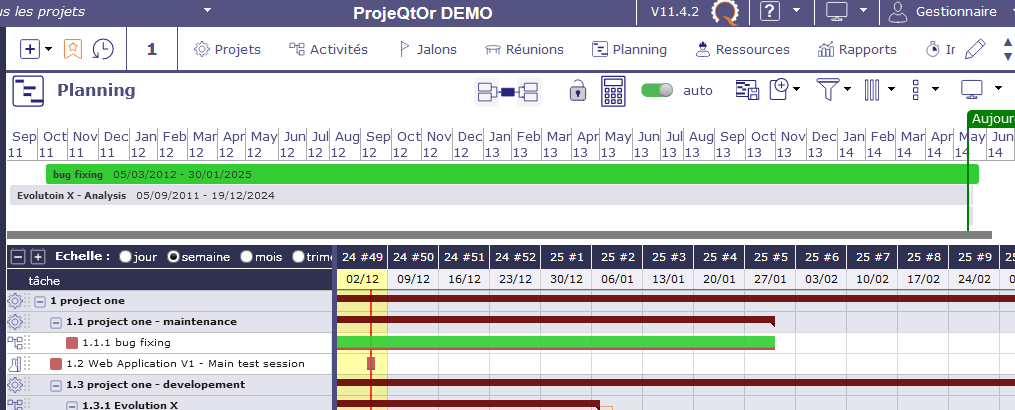
Regards,

They are displayed !
But the timeframe for "bug fixing" is from 2011 to 2024.
So a 2 days long tasks appears only as a small line and is almost not visible
Yes but, even i select :
- Project One
- Project One maintenance
- Project One development
- Evolution X - Analysis
- Project Two
- Project two - Management
And set Max line in timeline to 15,
I can only see 3 lines on timeline and need to use scrolling to see all of them.
Yes, it is designed this way : Timeline area is restricted to 3 visible lines. Idea is to preserve space for main planning part (gantt).
Then you can select how many lines will be visible, but not without scrolling.
Note that Timeline is not designed to show projet, parent activity and sub-activities.
The pûrpose of the timeline is to be able to see several tasks on same line, so you should not need so many display lines.
Thanks.
Is it possible to given ability to show more line in timeline, so it can be used (via copy/paste) in some documents (like strategical presentation) ?

We have not planned this possibility, the timeline not being the most used tool on the planning screen.
But do not hesitate to ask for a quote for a possible development via the form on our site!