
Welcome to ProjeQtOr new Forum. We migrated old forum to the new website.
You will find all your posts here, with your usual account.
Just one point : you’ll have to reinitialize your password. Use “Lost password” feature.

On dependencie between tasks, the value of the delay (late) can't be egal to 0.
When I put 0, an icone warning come
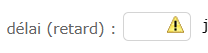
I can just use non null value of delay.
ProjeQtOr version : 12.4.2 Debian.
Best Regards

Cannot reproduce.
Set delay to zero is always possible
Moreover, it is the default value.
Try and migrate to 12.4.4 or V12.5.1
I update Projector at 13.0.1 version. But the issue is alwsays the same.
Best regards
Hi,
Delay of Zero must be entered as "0", not as an empty string (nothing in the field).
Note that we identified an issue on dependency update, the delay is reset (no value) instead of value 0 (zero). This is fixed on V13.0.2.
But you can always enter a 0 on the delay
I put "0" value and I save. But when I edit the task, the warning Icone re-appair.
I have not the warning icone if I put delay integer >0 or <0
This is exactly the issue fixed on V13.0.2 (and already available through the subscription service).
You put "0" and save : it is correcly saved with value zero. You can check that the planning takes it into account.
When you reopen the dependency pop-up, here occurs the anomaly : it displays empty field (with an error) instead of value "0"