
Welcome to ProjeQtOr new Forum. We migrated old forum to the new website.
You will find all your posts here, with your usual account.
Just one point : you’ll have to reinitialize your password. Use “Lost password” feature.
Notifications
Clear all

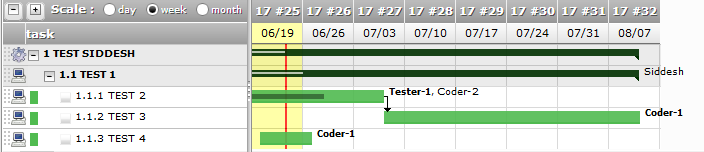
Topic starter
1. Select the Parameter > User parameters menu.
2. Set the date format parameter to DD/MM/YYYY format,
3. Now switch to the Planning or Resource Planning screen.
4. Set display mode to Weeks.
5. Look at the dateline. ProjeQtor always shows the date in MM/DD format.
Desired: ProjeQtor should respect the date format setting, and show the date as DD/MM.
Posted : 23 Jun 2017 13H05

Issue recorded as Ticket #2846
Thanks for reporting
Posted : 23 Jun 2017 15H41