
Welcome to ProjeQtOr new Forum. We migrated old forum to the new website.
You will find all your posts here, with your usual account.
Just one point : you’ll have to reinitialize your password. Use “Lost password” feature.

Hi everyone
Installing CentOS 6 projeqtor under x86_64 and postgresql 9.4 does not. I took the parameters in configuration in the "main view" GUI, and the system hangs. The log file is empty. 🙁
Can you help me?
Thanks for your answer.

Please check all prerequisites.
For instance mbstring is sometines missing.
Also give more hint :
the system hangs : for me it means the server is blocked, which is very serious
I guess it is not so serious, so please describe exactly the issue : step by step use case, exact behaviour, ...
Find in attachment the files which show the modules installed, then the interface of the configuration parameters. While pressing on “OK” button, it occurs anything, no error message, no log.
Note: the Apache server
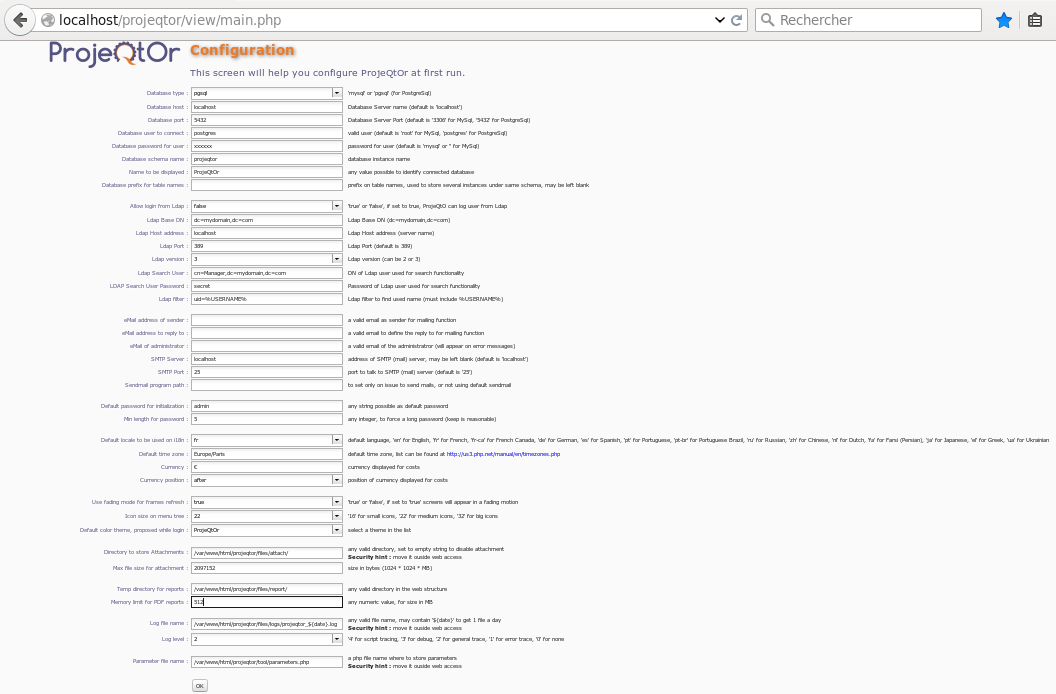
functions correctly.
1) Modules seem to be installed, but maybe they are not defined in php.ini
Best way to check is to define a new file info.php with just
then call the page
2) check errors in the browser console
3) check errors in apache logs
Find in attachment, the phpinfo and apache logs files.
Thank you so much for your help and your response.
Best regards
I try again all the process of installation with the emptying of the mask firefox, and I am always blocked.
Apache logs and phpinfo are OK without error (to see file in attachment).
Can you help me please?
Thank you so much
Hi,
PhpInfo show all needed modules...
No error in apache error log...
1) Can you check if a button did appear on bottom of scren (maybe scrolling bar is just hidden)
2) Chesk for arrors in the browser console (report here any error)
3) In network console, check last request send (url called) and response retreived and post it here.
Thanks.
Hi,
1) Can you check if a button did appear on bottom of scren (maybe scrolling bar is just hidden)
The scroll bar appears
2) Chesk for arrors in the browser console (report here any error)
No error found
3) In network console, check last request send (url called) and response retreived and post it here.
I do not know how to do, because I'm not an expert in IT
Thanks for your help and your response
Please try v5.0.4 : it includes new check for prerequisites (initially planned on V5.1, included in V5.0.4 to avoid missing prerequisites issues).
Maybe it can give some hints.
I tried the 5.0.4 with the parameters for postgresql 94, I do not have any message for the prerequisites. The configuration is always blocked.
Ok,
Let's do it step by step.
I guess that what you do is :
=> copy zip file into web directory of http server
=> run projeqtor into browser => you get the configuration page
=> fill in informtation (at least the database and log file information)
=> click on button "OK"
Correct me if I'm wrong...
Please detail what happens when you click on button "OK" :
1) absolutely nothing
2) a spinner appears for short time, then desepears : if so, is there a message and new button under "OK" ?
3) a spinner appears and never disepears
4) other behavior
Yes, it is that. The behavior correspond at the step 3. But, there is no error message under button “OK”.
OK,
Then you should have some Javascript error or none respondong server.
So, hit [F12] to open Dev tools.
1) Select "Console" tab : after running test, is there any error logged ?
2) Select "Network" tab : after running test, what is the latest request ? could you post here the response of this latest request ?
Thanks in advance.
Hi,
Find below, the results of your request.
Thanks.
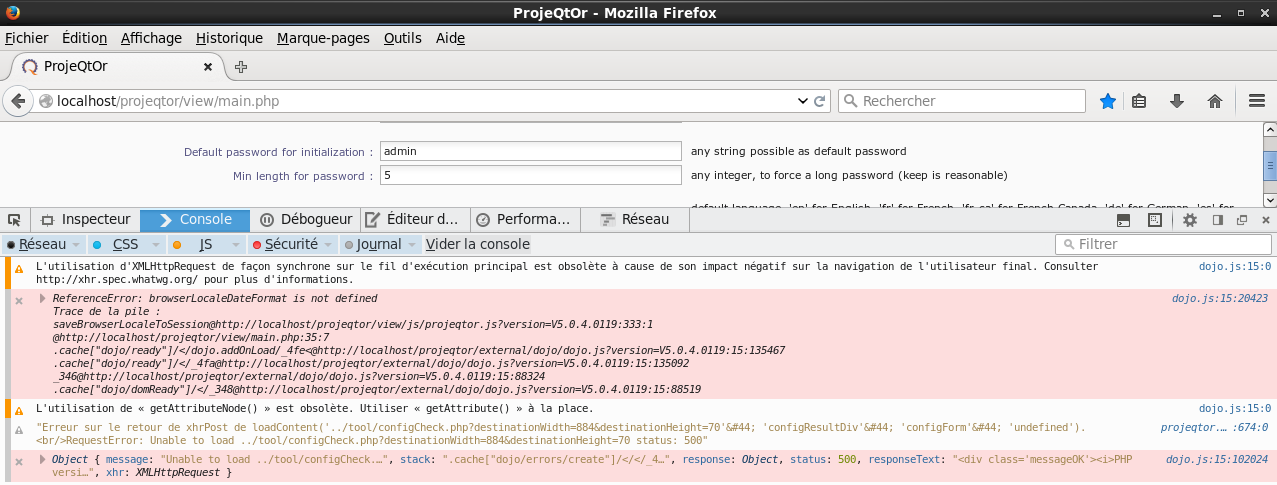
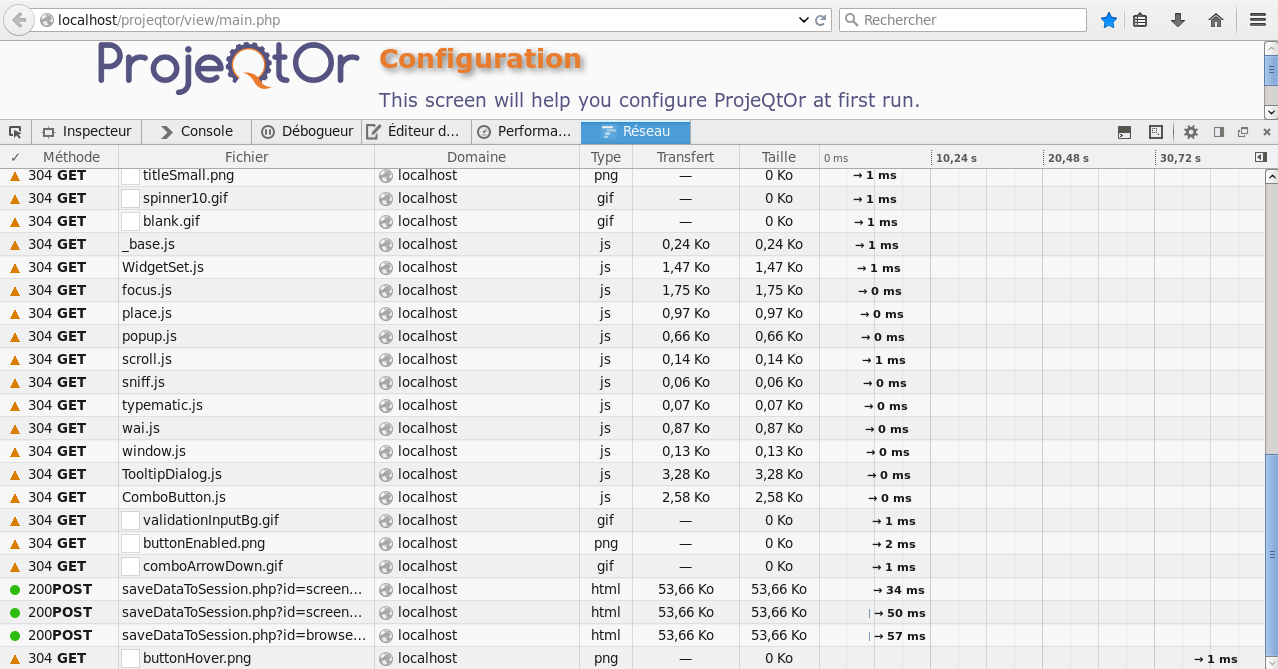
Hi,
You havr an error where calling configCheck.php (Status : 500)
I can see begining of response, which seems correct, but I need complete response to investigate.
In your find a call to configCheck.php : select this line in the table.
This should show new sub-tabs on the right.
Select "response" : copy complete response text and paste it here.
Thanks.
Hi,
Find below, the informations request.
===
===
Thank a lot for your help
You have connection issue :
SQLSTATE[08006] [7] could not connect to server: Permission denied Is the server running on host "localhost" (::1) and accepting TCP/IP connections on port 5432? could not connect to server: Permission denied Is the server running on host "localhost" (127.0.0.1) and accepting TCP/IP connections on port 5432?
What is strange is that you should have error displayed on screen.
First fix cnnection issue.
I'll have a look at error display.
Hi,
It is ok now. Projeqtor is launched.
I will be able to discover the new version
As root, I run :
1- [root@xxx~]# setsebool -P httpd_can_network_connect_db=1
2- [root@xxx ~]# getsebool httpd_can_network_connect_db
Thank a lot for your contribution and have a nice day.