
Welcome to ProjeQtOr new Forum. We migrated old forum to the new website.
You will find all your posts here, with your usual account.
Just one point : you’ll have to reinitialize your password. Use “Lost password” feature.

Hello again,
on a fresh install of 8.5.5 ... I cannot see any «type of change request» menu entry even if the steering module is activated.
I may be really tired, but I really believe I saw it (and changed it) previously :/
How am I supposed to be able to change the list of types of change requests ?

Change request type still exists.
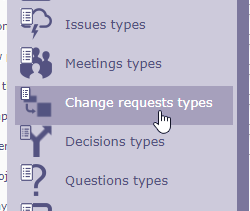
Well ... it’s quite disappointing as the steering feature is properly checked on my installation but the menu entry is definetly missing (and also missing in the access rights screen) ?
Can you tell me how I can activate it "manually" ? or where I could have a look to understand what happens ?
Have a look at "access to screen".
Possible it was disabled for your profile.
This is exactly what is disappointing: the «change request» is well checked in the "access to screen" ... but the «type of change request» does not even exist in this menu (I however have "all" the other "type of ...") ??!!
(EDIT : For example I have «type of meetings» and «type of decisions» but no «type of change request»)
Try and execute this query :
UPDATE menu SET idle=0 WHERE idle IS NULL;
Great ! It worked !
Thank you very much 🙂